In the fast-paced banking and finance sector of the UAE, paper-based workflows are a bottleneck. They slow down customer onboarding, create compliance risks, and increase operational costs. Wacom’s pen displays, specifically the DTU-1141B and DTU-1031AX, offer a solution by transforming document signing into a secure, efficient digital process. This article breaks down how these devices support e-signature workflows in UAE banks, helping you decide which model is the right fit for your branches. You’ll see why a true pen display is a major upgrade over a basic signature pad for any document-heavy operation.
What Are the Wacom DTU-1141B and DTU-1031AX?
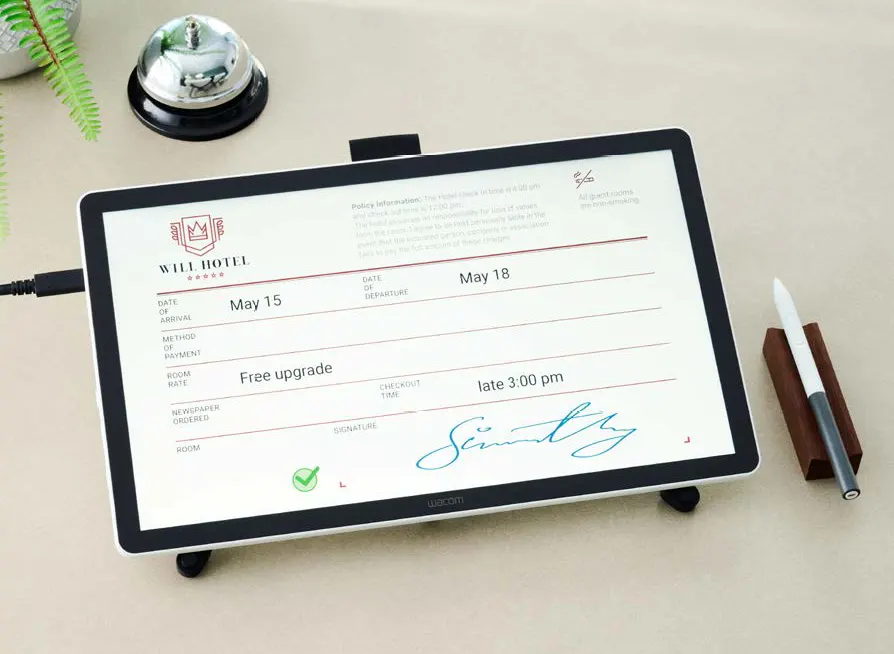
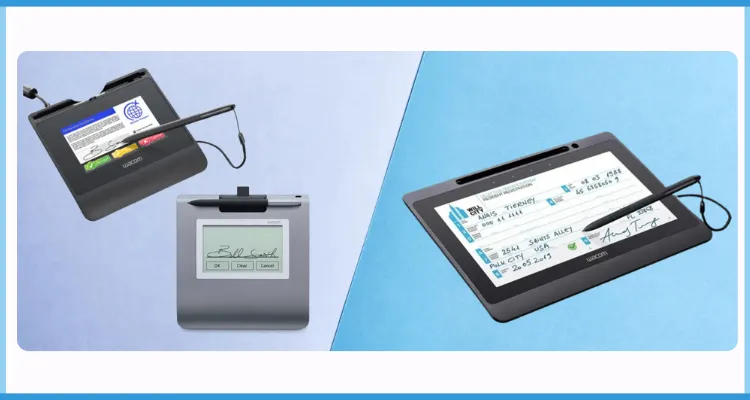
The Wacom DTU-1141B and Wacom DTU-1031AX are professional pen displays built for enterprise document workflows. Unlike traditional signature pads where you sign on a blank surface, these devices feature a 10.1-inch LCD screen. This lets your customers see the actual document—be it a contract, account form, or loan agreement—and sign directly on it with a digital pen.
This “pen-on-screen” approach is what sets them apart. It eliminates the ambiguity of signing blind and gives customers the confidence to review what they’re approving.
Both models use Wacom’s battery-free electromagnetic resonance (EMR) pen technology. This is a huge advantage in a busy UAE branch. You’ll never have to worry about pens dying, charging stations, or operational downtime at a customer-facing counter. The pen just works, all day long.
Why Does Pen-on-Screen Signing Matter for Banking and Finance?
Pen-on-screen signing is about clarity and integrity. When customers can read the terms and see exactly where their signature is being placed on the document, the entire process becomes more transparent and legally sound. This is critical for banks and financial institutions in the UAE that handle documents filled with dense text, multiple signature fields, and regulatory disclosures.
This capability streamlines crucial workflows, including:
- Account opening applications
- Loan and mortgage agreements
- Customer consent forms
- Internal compliance and approval cycles
Both the DTU-1141B and DTU-1031AX integrate seamlessly with sign pro PDF, Wacom’s software for secure document signing. This combination allows your team to manage annotations, mark-ups, and secure signature capture within a single, controlled workflow—exactly what’s needed for structured and auditable document handling at branch counters.
Core features for banking and finance include:
- Direct Pen-on-Screen Signing: Customers view and sign PDFs and digital documents right at the counter.
- PDF Annotation: Enables multi-step review and approval workflows for complex processes.
- Battery-Free Pen: Eliminates charging and maintenance, ensuring maximum uptime.
- Kensington Security Slot: Allows you to physically lock the device at public-facing counters.
- Simple USB Connectivity: Ensures straightforward integration with existing branch workstations.
What is sign pro PDF for Secure Financial Workflows?
sign pro PDF is Wacom’s dedicated software platform designed to work with the DTU-1141B and DTU-1031AX. It lets users open, annotate, and securely sign PDF documents directly on the pen display. This creates a structured and contained signing process, which is essential for regulated environments like banking.
For UAE financial operations, sign pro PDF is ready to handle all common document types, from account forms to internal approval sheets. By keeping every signing session within a defined and repeatable process, it gives your institution a clear, auditable trail for every transaction.
Who Should Buy Wacom Pen Displays in the UAE?
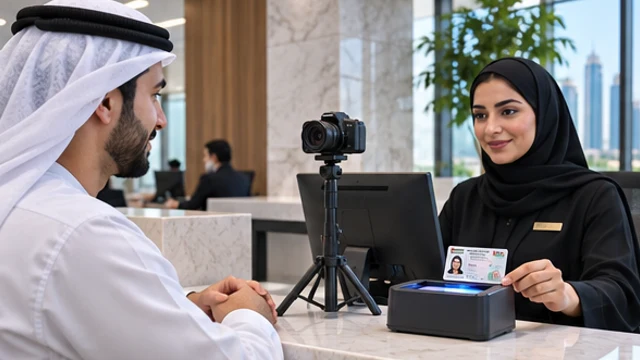
Any banking or finance organization in the UAE with customer service counters or branch networks is a prime candidate for these devices. Both the DTU-1141B and DTU-1031AX are compact desktop units designed for countertop deployment, making them a perfect fit for the space-constrained branch layouts often found in Dubai and Abu Dhabi.
Front-Office: The DTU-1141B is the ideal choice for premium customer stations like wealth management desks or mortgage advisory counters. Its high-resolution display ensures clients can comfortably read complex, multi-page agreements before signing. The DTU-1031AX is a practical workhorse for deploying e-signatures at scale across numerous standard service counters.
Back-Office: Finance and compliance teams that process high volumes of internal approvals also benefit immensely. The pen-on-screen workflow reduces paper handling and storage costs while keeping the signing action familiar and intuitive. The document trail becomes fully digital, secure, and easy to audit.
Wacom DTU-1141B vs. Wacom DTU-1031AX: Which Is Right for Your Use Case?
While both models share the same 10.1-inch screen size and core technology, the key difference lies in display resolution. Your choice depends on how detailed your documents are and the scale of your deployment.
| Feature | Wacom DTU-1141B | Wacom DTU-1031AX |
|---|---|---|
| Display Size | 10.1-inch LCD Display | 10.1-inch LCD Display |
| Native Resolution | 1920 × 1080 (Full HD) | 1280 × 800 (WXGA) |
| Active Area | 223.2 × 125.6 mm | 216.9 × 135.6 mm |
| Pen Technology | Battery-Free Electromagnetic Resonance (EMR) Pen | Battery-Free Electromagnetic Resonance (EMR) Pen |
| Connectivity | USB Connectivity | USB Connectivity |
| Security Feature | Integrated Kensington Security Slot | Integrated Kensington Security Slot |
| Key Differentiator | Full HD Display for Superior Document Clarity and Signature Accuracy | Cost-Effective Solution for Large-Scale Deployments |
| Best For | Premium Customer Service Counters, Banking, Healthcare & Complex Digital Document Signing | High-Volume Branch Rollouts, Retail Chains, Government Offices & Enterprise Deployments |
The DTU-1141B is the clear winner when document legibility is paramount. Its Full HD (1920 x 1080) resolution makes fine print and dense forms easy to read without zooming, reducing friction during customer onboarding at premium banking counters.
The DTU-1031AX delivers the same essential pen-on-screen benefits at a specification that’s perfect for standard signing stations. For institutions rolling out e-signatures across dozens of branches, it provides a consistent and cost-effective solution without sacrificing the core functionality.
Choose the Wacom DTU-1141B if…
- Your signing stations handle complex mortgage, corporate, or wealth management agreements.
- Delivering a premium customer experience is a top priority.
- You need the best possible document readability in a 10.1-inch form factor.
Choose the Wacom DTU-1031AX if…
- You’re deploying signing stations across a large network of branches and need a scalable solution.
- Your primary use case is standard account opening or customer agreements.
- Your priority is achieving broad deployment coverage across your UAE network cost-effectively.