






This guide covers everything UAE creative professionals need to decide whether the Wacom Cintiq Pro 27 is the right investment in 2026 or whether waiting for a next-generation model makes more sense. By the end, you will have a clear, evidence-based answer matched to your specific workflow and budget situation.
What Is the Wacom Cintiq Pro 27?
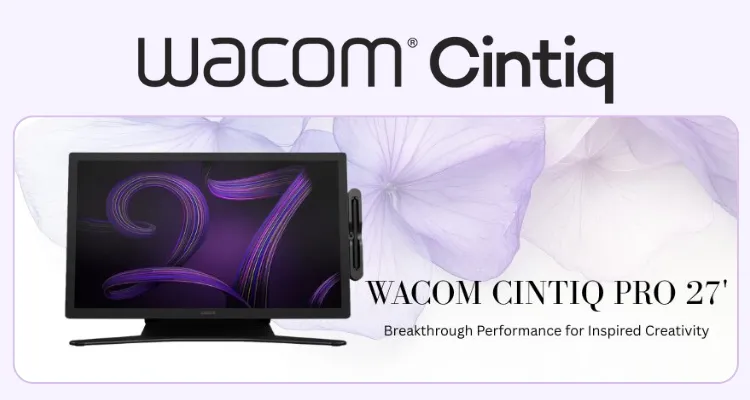
The Wacom Cintiq Pro 27 Interactive Pen Display (model DTH271K0A) is Wacom’s flagship professional pen display, introduced in 2022 as the largest and most advanced model in the current Cintiq Pro lineup. It is a 26.9-inch pen-on-screen display that requires connection to a computer, designed for direct drawing, illustration, photo editing, animation, and VFX work at the highest professional level. The Cintiq Pro 27 holds a market position described by independent reviewers including PCMag and Dell as the “gold standard” professional pen-based interactive display.
4K Display and Color Accuracy: The Core Strength
The Wacom Cintiq Pro 27 delivers a 3840 x 2160 UHD 4K IPS panel at up to 120 Hz refresh — confirmed as the first pen display to combine these specifications with both 98% DCI-P3 and 99% Adobe RGB color gamut coverage. This matters directly for UAE studios working in broadcast, cinema, advertising, and luxury brand content where color must remain consistent from grading to final delivery.
The Cintiq Pro 27 supports genuine 10-bit color, rendering over 1.07 billion shades — not 8-bit with dithering — which is critical for smooth gradients in retouching and post-production. It carries both Pantone Validated and Pantone SkinTone Validated certifications, and supports HDR PQ/HLG gamma for HDR-enabled workflows.
The Cintiq Pro 27 reaches 400 cd/m² brightness at a 1000:1 contrast ratio, with a 10 ms response time that pairs with the 120 Hz panel for near-zero drawing latency. User feedback consistently identifies improved brightness and smoother motion as significant upgrades over earlier Cintiq Pro generations.
These specifications make it directly applicable to UAE professional environments:
- 98% DCI-P3 coverage aligns with cinema and streaming delivery standards
- 99% Adobe RGB meets commercial print and advertising requirements
- 100% Rec.709 covers broadcast video production
- Pantone SkinTone Validated certification supports fashion, beauty, and portrait photography work
- HDR PQ/HLG gamma support enables HDR-native post-production
Pro Pen 3: Precision and Ergonomics
The Wacom Pro Pen 3 is a battery-free EMR stylus delivering 8,192 pressure levels, 60° tilt recognition, and three programmable side buttons. Its defining advantage over previous Wacom pens is the system of interchangeable grips and weights, allowing artists to customise the pen’s feel and balance to match their technique and session length.
Professional user feedback confirms that the customisable ergonomics reduce fatigue during extended sessions — a practical concern for UAE studios running full-day production workflows. One important compatibility note: the Pro Pen 3 is not cross-compatible with some previous-generation Wacom devices, including certain Cintiq Pro 16 second-generation models, which affects upgrade decisions for users with existing Wacom hardware.
Build, Design, and Connectivity
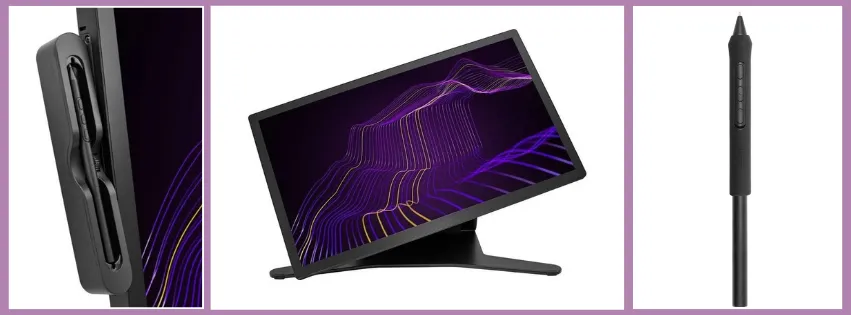
The Wacom Cintiq Pro 27 measures 379 x 638 x 31 mm with an active drawing area of 596 x 335 mm. The front surface uses edge-to-edge tempered glass with anti-glare, textured treatment that simulates paper-like pen resistance. VESA 100 x 100 mm mounting holes are built in, and a proprietary Ergo Stand is available separately for adjustable working angles.
Connectivity includes 1x mini DisplayPort, 1x HDMI, 2x USB Type-C, and 1x USB Standard-A, supporting both modern USB-C DisplayPort Alt Mode workstations and traditional HDMI or DisplayPort-equipped setups. The Cintiq Pro 27 is compatible with Windows 10 or later and macOS 10.15 or later. Eight ergonomically placed ExpressKeys, a touch on/off slider, 10-finger multi-touch, and on-screen radial menus complete the workflow control set.
Who Should Buy the Wacom Cintiq Pro 27 in the UAE?
The Wacom Cintiq Pro 27 is built for professional creative practitioners who need colour-critical output, large drawing real estate, and long-session ergonomics. It is not entry-level equipment — it is workstation-grade hardware for studios with demanding delivery requirements.
Specific UAE buyer profiles that match this Cintiq Pro 27 include:
- VFX and 3D artists in Dubai and Abu Dhabi production houses needing frame-accurate, low-latency pen input at 4K
- Advertising and brand agencies working across DCI-P3 and Adobe RGB deliverables for regional and international clients
- Broadcast and streaming post-production teams requiring Rec.709 validated colour grading displays
- Photographers and retouchers in fashion and luxury sectors where Pantone SkinTone validation is operationally relevant
- Game developers and concept artists using studios in free zones such as Dubai Production City or twofour54 in Abu Dhabi
- Individual senior artists whose income depends on professional delivery quality and who require a durable long-term workstation investment
Users on tighter budgets, with limited desk space, or who are not yet working to broadcast or cinema colour standards will find the Cintiq Pro 27 over-specified for their current needs.
Wacom Cintiq Pro 27 vs Wacom Cintiq Pro 22: Which One Is Right for Your Use Case?
The Wacom Cintiq Pro 27 and the Wacom Cintiq Pro 22 serve the same professional audience but differ in display size, workspace, and the specific environments they suit best.
Choosing between them is primarily a question of physical workspace and whether the larger active area delivers meaningful workflow gains for your discipline.
| Feature | Wacom Cintiq Pro 27 | Wacom Cintiq Pro 22 |
| Model / SKU | DTH271K0A | DTH227k0b |
| Display Size | 26.9 inches | 22 inches |
| Core Technology | 4K IPS, 120 Hz, 10-bit, Pro Pen 3 | Same core pen and display technology range |
| Key Differentiator | First 120 Hz 4K pen display; 98% DCI-P3, 99% Adobe RGB | Smaller footprint; more compact workstation fit |
| Active Drawing Area | 596 x 335 mm | Smaller active area |
| Stand Included | No — proprietary Ergo Stand sold separately | No — stand sold separately |
| Best For | Large-studio VFX, colour grading, detailed animation | Individual artists, space-constrained workstations |
| VESA Mounting | 100 x 100 mm | VESA compatible |
The Cintiq Pro 27 is the better choice for studio environments where screen real estate directly affects output quality — animators working with detailed timelines, colourists managing multiple tool panels, or VFX artists needing to see fine detail at native 4K without scaling. The larger workspace reduces the need to zoom and pan constantly, which user feedback identifies as a meaningful productivity gain during long sessions.
The Cintiq Pro 22 suits individual artists or small agencies working in Dubai or Abu Dhabi where desk space is limited and the workflow does not demand the full 26.9-inch canvas. Community feedback suggests the Pro 22 is also a rational entry point for professionals transitioning to pen display work who do not yet need the full specification of the Pro 27.
Choose the Wacom Cintiq Pro 27 if…
- Your workflow demands colour-grading to DCI-P3 or broadcast Rec.709 standards
- You run long sessions where ergonomic pen customisation and large working area reduce fatigue
- Your studio or client deliverables require Pantone-validated colour accuracy
- You need HDR gamma support for HDR-native post-production
Choose the Wacom Cintiq Pro 22 if…
- Your workspace is limited and a 26.9-inch display is physically impractical
- You are an individual artist who does not need the full 4K 120 Hz specification
- You want a lower total investment while retaining professional Wacom pen display quality
Should You Wait for the Next-Generation Wacom Flagship?
Waiting for the next Wacom flagship is a reasonable consideration, but the research data contains no confirmed announcement or release timeline for a Cintiq Pro successor as of 2026. The Cintiq Pro 27 was introduced in 2022, meaning it is currently in mid-lifecycle — not end-of-life — and its specifications remain at the top of the professional pen display category.
The practical case for buying now is strong if your current workflow is actively limited by your existing hardware. A 120 Hz 4K pen display with genuine 10-bit colour and Pantone validation will remain professionally relevant for several years. The case for waiting is only rational if your current setup is adequate and you have no pressing production need — waiting without a confirmed product launch date carries the risk of indefinite deferral.
Frequently Asked Questions
What is the Wacom Cintiq Pro 27 price in UAE?
The Wacom Cintiq Pro 27 (model DTH271K0A) price in the UAE is available on request through eTOP. Pricing is not listed publicly, and eTOP can provide current pricing along with bundle options and UAE warranty details. The proprietary Ergo Stand is not included and is priced separately.
Where can I buy the Wacom Cintiq Pro 27 in Dubai?
The Wacom Cintiq Pro 27 is available through eTOP, which provides UAE pricing, availability confirmation, and warranty support. Contact eTOP directly for stock status and procurement options for Dubai and Abu Dhabi-based studios.
Does the Wacom Cintiq Pro 27 come with UAE warranty?
UAE warranty support for the Wacom Cintiq Pro 27 is available through eTOP. Confirm specific warranty terms, duration, and coverage at the point of purchase through eTOP to ensure your studio investment is fully protected.
Is the Wacom Cintiq Pro 27 better than the Wacom Cintiq Pro 22?
The Wacom Cintiq Pro 27 is positioned above the Wacom Cintiq Pro 22 in the product range, offering a larger 26.9-inch active drawing area versus the Pro 22’s 22-inch display. The Cintiq Pro 27 is confirmed as the first 120 Hz 4K pen display in Wacom’s lineup with 98% DCI-P3 and 99% Adobe RGB coverage. The Pro 22 is better suited for space-constrained setups or users who do not require the full large-format workspace.
What is included in the box with the Wacom Cintiq Pro 27?
The Wacom Cintiq Pro 27 box includes the display unit, the Wacom Pro Pen 3, interchangeable pen grips and weights, and connectivity cables including HDMI, mini DisplayPort, USB Type-A, and USB Type-C. The Ergo Stand is not included and must be purchased separately.
Is the Wacom Cintiq Pro 27 still relevant in 2026?
The Wacom Cintiq Pro 27 remains the most advanced model in Wacom’s current Cintiq Pro range, introduced in 2022 and still carrying the highest specifications available in a professional Wacom pen display. No confirmed successor model has been announced as of this guide. Its 4K 120 Hz panel, genuine 10-bit colour, and Pantone validation keep it at the top of the professional creative display category in 2026.