
This article covers everything a UAE or Middle East business decision-maker needs to know about the Wacom STU-540 signature tablet — its features, security capabilities, ideal use cases, and how it compares to the Wacom STU-430. By the end, you will know whether this device fits your organisation’s signing workflow requirements.
Key Takeaways
- Core Functionality: Customer-facing signature pad featuring a 5-inch full-colour TFT LCD screen for viewing documents directly at the point of signing.
- Advanced Security: Built with hardware-level AES-256 and RSA encryption, secure boot, and hardware device integrity checks.
- Hardware & Durability: Equipped with a battery-free pen with 1,024 pressure levels, hardened glass surface, and USB/Serial connectivity.
- Target Audience: Designed for UAE banks, government counters, insurance providers, retail POS, and healthcare organisations.
- Procurement: Available across Dubai, Abu Dhabi, and the Middle East through authorised dealer eTOP, offering pricing on request and regional warranty support.
What Is the Wacom STU-540 Signature Pad?
This article covers everything a UAE or Middle East business decision-maker needs to know about the Wacom STU-540 signature tablet — its features, security capabilities, ideal use cases, and how it compares to the Wacom STU-430. By the end, you will know whether this device fits your organisation’s signing workflow requirements.
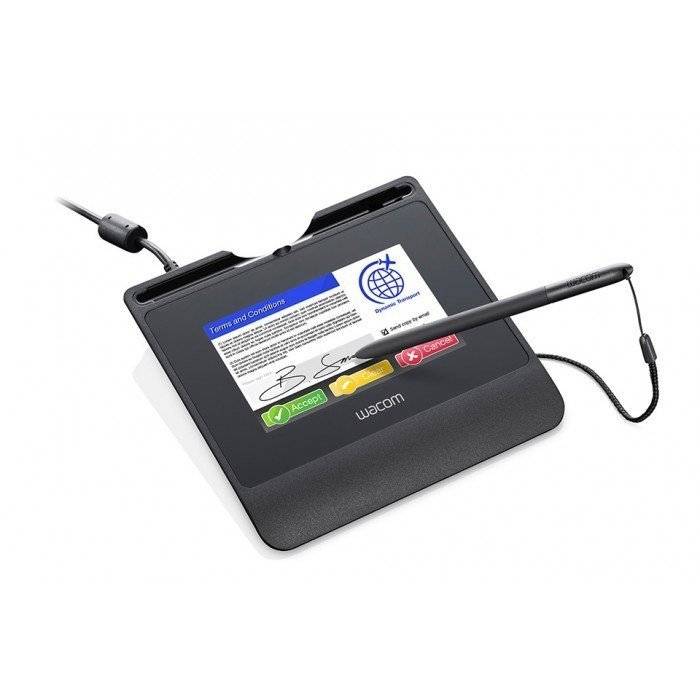
The Wacom STU-540 Signature Pad is a premium, customer-facing electronic signature capture device designed for professional, secure document signing workflows. Manufactured by Wacom, a globally recognised brand in pen input technology, the STU-540 features a 5-inch colour LCD display that allows customers to view documents and sign directly on the screen. This positions the STU-540 above basic monochrome pads in both functionality and user experience.
The STU-540 targets industries where signature integrity and customer-facing clarity are non-negotiable. Banks, government service counters, insurance desks, retail point-of-sale environments, and healthcare organisations in the UAE and across the Middle East are its primary deployment contexts.
Why Is Colour LCD Display and Security Key for UAE Enterprises?
The Wacom STU-540’s most significant capability is its combination of a full-colour display and hardware-level security — two features that directly address the requirements of regulated, high-volume signing environments in the UAE.
The 5-inch TFT LCD screen delivers an 800 x 480 pixel resolution across a 108.0 x 65.0 mm active signing area. This means customers can read document content clearly before signing, reducing disputes and improving transaction confidence at the counter. In UAE front-office environments — where professionalism and speed matter — this distinction is operationally significant.
Hardware-Based Security Features
The STU-540 includes hardware-based encryption and integrity features that go well beyond basic pad-level security:
- AES-256 encryption protects signature data during capture and transmission.
- RSA encryption adds asymmetric cryptographic protection to the signing process.
- Secure boot ensures the device firmware loads in a verified, trusted state at every startup.
- Device integrity checks detect unauthorised firmware changes, protecting regulated workflows.
- Hardware-based secure signature capture processes signature data at the device level, not the application level.
How Is the Build Quality and Connectivity Designed?
Battery-Free Pen and Hardened Glass Build
The Wacom STU-540 ships with a battery-free, cordless pen that requires no charging and no battery replacement. This is a practical operational advantage for high-volume service counters in Dubai banks or Abu Dhabi government offices where daily uptime is critical.
The signing surface uses hardened glass, designed to withstand continuous customer interaction without degradation. The pen delivers 1,024 pressure levels, capturing natural handwriting dynamics accurately for signature authenticity. This means organisations get both durability and biometric-grade signing fidelity from a single device.
USB Connectivity and Deployment Simplicity
The Wacom STU-540 connects via USB and is powered entirely through the USB connection — no separate power supply is required. This simplifies branch-level rollout for enterprise IT teams managing deployments across multiple locations.
Where applicable, the STU-540 also supports serial mode via DisplayLink, offering additional flexibility in legacy or specialised infrastructure environments. USB-powered operation means the device integrates cleanly into standard counter setups without additional cabling or power management complexity.
Who Should Buy the Wacom STU-540 Signature Tablet in the UAE?
The Wacom STU-540 signature tablet is the right choice for organisations that need a secure, professional, and customer-visible signing experience at the point of service. This is not a back-office device — it is built for customer-facing counters where both trust and clarity matter.
Specific buyer profiles in the UAE and Middle East that the STU-540 directly serves include:
- UAE banks and financial institutions in Dubai and Abu Dhabi requiring AES-256/RSA-secured signature capture for account opening, loan signing, and KYC processes.
- Government service counters where auditable, tamper-resistant electronic signatures are required for citizen-facing document workflows.
- Insurance companies needing customers to sign policy documents with full on-screen document visibility.
- Retail point-of-sale environments requiring a reliable, low-maintenance signing device that operates daily at high volume.
- Healthcare and hospital reception desks capturing patient consent signatures in a professional, legally defensible format.
- Customer service centres across the GCC that are transitioning from paper-based to digital document workflows.
Wacom STU-540 vs Wacom STU-430: Which One Is Right for Your Use Case?
The Wacom STU-540 and the Wacom STU-430 serve different tiers of signature capture requirement. The STU-540 is the premium, security-focused model; the STU-430 is a simpler, monochrome alternative suited to lower-complexity deployments. Understanding the difference prevents over-specification or under-investment.
| Feature | Wacom STU-540 | Wacom STU-430 |
|---|---|---|
| Model / SKU | Wacom STU-540 | Wacom STU-430 |
| Display Type | 5-inch Full-Colour TFT LCD Signature Display | Monochrome LCD Signature Display |
| Display Size | 5.0-inch Colour Screen for Full Document Preview | Compact Monochrome Display for Signature Capture |
| Encryption | AES-256 and RSA Hardware Encryption for Secure Digital Signatures | Standard Hardware Security with Lower Encryption Specification |
| Secure Boot | Yes – Secure Boot Technology Supported | Not Confirmed at the Same Enterprise Security Level |
| Device Integrity Checks | Hardware-Level Device Integrity Verification | Not Available or Not Confirmed |
| Key Differentiator | Full-Colour Document Display with Enterprise-Grade Security Features | Cost-Effective Electronic Signature Pad for Everyday Signing Applications |
| Best For | Banks, Government Offices, Healthcare, Insurance and Other Regulated Industries | Retail Counters, Reception Desks, SMEs and Low-Volume Digital Signature Workflows |
| Connectivity | USB Connectivity with Serial Communication via DisplayLink | USB Connectivity |
Choose the Wacom STU-540 if…
- Your workflow requires AES-256 or RSA-level encryption for compliance.
- Customers need to view document content on-screen before signing.
- Your organisation operates in a regulated sector such as banking, government, or healthcare.
- Device firmware integrity is a requirement under your IT security policy.
Choose the Wacom STU-430 if…
- You need a simpler, lower-complexity signature capture device.
- Full-colour document display is not required at the signing point.
- Your deployment environment has lower security or compliance requirements.