

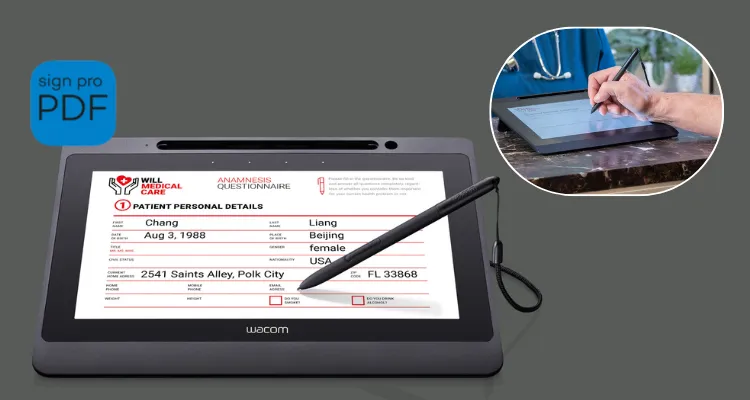
This guide covers everything UAE decision-makers need to know about the Wacom DTU-1141B-CH2, from its display specifications and encryption capabilities to deployment fit across banking, healthcare, and government sectors. By the end, you will have a clear picture of whether this signature display belongs in your organisation’s document workflow.
Key Takeaways
- The Wacom DTU-1141B-CH2 is a 10.1-inch Full HD IPS pen display designed for secure electronic signature capture in UAE enterprise environments.
- The device uses a battery-free EMR pen with 1024 pressure levels and AES-256 encryption with RSA 2048-bit key exchange.
- It ships as a complete Signature Set including Wacom Sign Pro PDF for Windows and requires no external power adapter.
- The DTU-1141B-CH2 is available in the UAE through eTOP Trading and is compatible with Windows 10 and Windows 11.
What Is the Wacom DTU-1141B-CH2?
The Wacom DTU-1141B-CH2 Signature Set is a 10.1-inch pen display designed specifically for secure electronic handwritten signature capture and paperless document workflows in enterprise and institutional environments. Manufactured by Wacom, this unit is sold as a complete set that bundles the DTU-1141B pen display hardware with Wacom Sign Pro PDF software for Windows, giving organisations a ready-to-deploy e-signature solution out of the box. The DTU-1141B-CH2 is confirmed available in the UAE and GCC market, positioned for high-compliance sectors including banking, healthcare, government, legal, education, and corporate environments.
Full HD IPS Display: Clarity at the Point of Signing
The Wacom DTU-1141B-CH2 delivers a 1920 x 1080 Full HD IPS LCD display in a compact 10.1-inch form factor, making it the defining hardware advantage of this device over earlier signature displays. IPS technology provides consistent colour and sharpness across its wide 170°/170° horizontal and vertical viewing angles, which means customers, patients, and clients can read exactly what they are signing without repositioning themselves. This matters in UAE bank branches and service counters where both staff and customers view the screen simultaneously.
The panel delivers a 1000:1 contrast ratio and 200 cd/m² brightness, keeping text legible under the strong overhead lighting typical in UAE retail banking branches and government service centres. Its anti-glare surface further reduces reflection in glass-fronted spaces. A 25 ms response time ensures there is no perceptible lag between pen movement and on-screen feedback during signature capture.
The DTU-1141B-CH2 supports these display performance metrics confirmed by Wacom’s specification documentation:
- Resolution: 1920 x 1080 pixels at 16:9 aspect ratio
- Panel type: IPS LCD for consistent colour across wide angles
- Brightness: 200 cd/m² for readability under indoor lighting
- Contrast: 1000:1 for sharp text rendering on contracts and forms
- Viewing angles: 170° horizontal and vertical for shared viewing
- Anti-glare surface: Reduces reflections in bright UAE service environments
Battery-Free EMR Pen and Enterprise-Grade Encryption
The Wacom DTU-1141B-CH2 uses a cordless, battery-free EMR pen that captures handwritten signatures with 1024 pressure levels, 2540 lpi resolution, and ±60° tilt recognition. This combination produces biometric-quality signature data, recording pen pressure, X/Y position, tilt, and timing — attributes that support legally robust, court-admissible electronic signatures in regulated UAE industries where signature integrity is non-negotiable.
Security is enforced through AES-256 encryption paired with RSA 2048-bit key exchange, and each unit carries a unique hardware ID that identifies the specific device used for every signing event. The DTU-1141B-CH2 stores no user data on the device itself — all signature and document information is processed on the host PC. This architecture simplifies risk assessments for UAE IT and compliance teams handling customer and patient data under strict internal controls.
Build, Design, and Connectivity
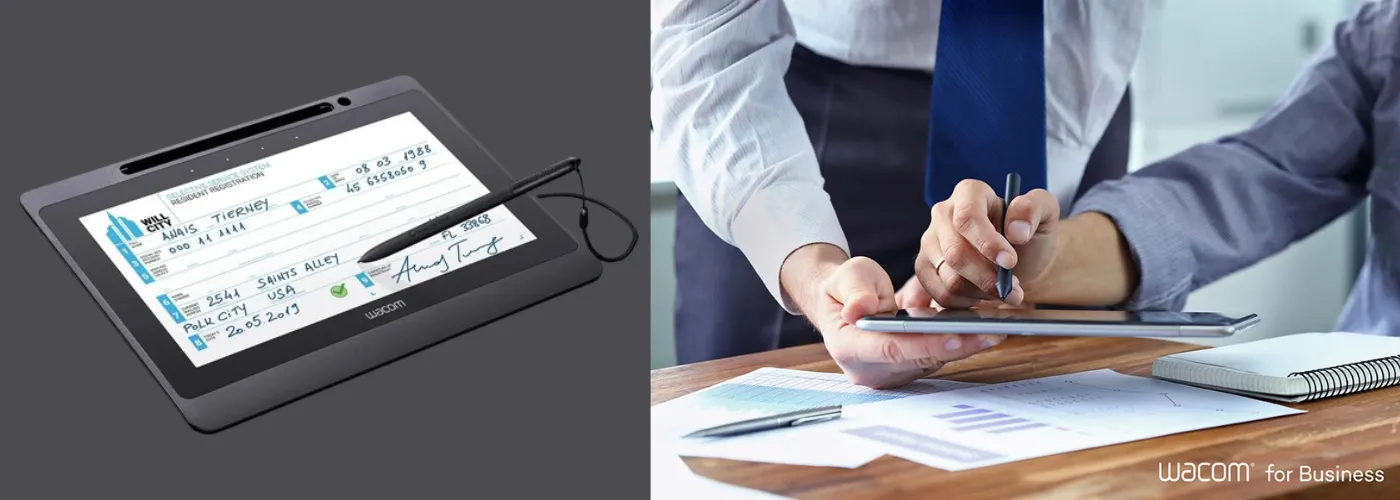
The Wacom DTU-1141B-CH2 measures 283 x 210 x 11 mm and weighs 800 g, making it slim enough to sit flush on a teller counter or reception desk without occupying significant workspace. The chassis is black, and the display surface features an integrated fold-out stand that supports both angled and flat use positions. VESA mounting holes allow third-party arms or kiosk mounts for permanent counter installations, and a Kensington security slot enables physical cable-lock security in high-traffic UAE environments.
The DTU-1141B-CH2 connects via a single USB 2.0 Type-A cable that carries power, data, and the display signal simultaneously, eliminating any need for an external power adapter. This single-cable architecture is particularly practical for UAE bank teller counters, hospital reception desks, and government service kiosks where cable management and desk space are constrained. Four touch-activated ExpressKeys on the device allow users to trigger frequently used functions without reaching for a keyboard.
Software Compatibility and SDK Integration
The Wacom DTU-1141B-CH2 Signature Set ships with Wacom Sign Pro PDF for Windows, enabling secure PDF signing and annotation without custom software development. It is also confirmed compatible with eTOPSign, a Wacom-related signature application listed for this specific SKU. For organisations requiring deeper integration, Wacom provides the Wacom Signature SDK and Wacom Ink SDK, both applicable to DTU-series devices and supporting custom enterprise document management system development.
The DTU-1141B-CH2 requires dedicated DTU-series drivers rather than Wacom’s standard creative tablet drivers. Users in mixed-device environments — where Wacom Intuos or Cintiq units are also deployed — should plan for this driver separation during IT rollout, as it can complicate driver management across device types. Operating system support covers Microsoft Windows 10 and Windows 11 in both 32-bit and 64-bit editions.
Who Should Buy the Wacom DTU-1141B-CH2 in the UAE?
The Wacom DTU-1141B-CH2 is designed for UAE enterprises and institutions that handle regulated, high-value, or high-volume document signing. Banking and financial services organisations in Dubai and Abu Dhabi deploying customer-facing signature capture at teller windows and service desks will benefit from its Full HD display, biometric pen data, and AES-256 encryption. Healthcare providers requiring patient consent workflows need a device that captures legally admissible signatures without retaining data on the hardware itself — the DTU-1141B-CH2 addresses both requirements directly.
Government service centres, legal firms, and corporate HR departments processing high volumes of contracts and agreements in the UAE will find the bundled Sign Pro PDF software reduces time to deployment. Educational institutions requiring student enrolment or consent form signing can benefit from the device’s durability and bus-powered simplicity. Organisations already using eTOPSign as their signature platform have confirmed software compatibility with this specific SKU.
Wacom DTU-1141B-CH2 vs Wacom DTU-1031AX: Which One Is Right for Your Use Case?
Both the Wacom DTU-1141B-CH2 and the Wacom DTU-1031AX serve enterprise e-document and signature workflows, but they differ meaningfully in display resolution, security feature depth, and intended deployment tier. Choosing between them depends on whether your organisation prioritises advanced encryption and full HD clarity or cost-optimised basic signing capability.
| Feature | Wacom DTU-1141B-CH2 | Wacom DTU-1031AX |
| Model / SKU | DTU-1141B-CH2 | DTU-1031AX |
| Core Technology | Full HD IPS LCD + EMR pen + AES-256 encryption | Pen display for eDocuments, entry-level positioning |
| Display Resolution | 1920 x 1080 Full HD | Lower resolution; not Full HD |
| Encryption | AES-256 with RSA 2048-bit key exchange + unique hardware ID | Not emphasised in available documentation |
| Product Generation | Newer-generation with enhanced display and security | Earlier-generation entry-level device |
| Key Differentiator | Enterprise security, biometric pen data, Full HD display | Cost-optimised for basic e-document viewing and signing |
| Best For | Regulated industries: banking, healthcare, government, legal | Smaller offices and lower-risk signing workflows |
| Connectivity | Single USB 2.0, bus-powered | USB connectivity |
The Wacom DTU-1141B-CH2 is the clear choice for UAE organisations operating under compliance pressure, handling sensitive customer data, or requiring court-admissible biometric signature capture. Its AES-256 encryption and unique hardware ID per unit create an audit trail that the DTU-1031AX does not replicate at the same level of documented assurance.
The Wacom DTU-1031AX suits smaller UAE offices or internal workflows where signing volume is low, documents are not highly sensitive, and budget optimisation outweighs the need for advanced security features. Community feedback confirms that both devices deliver adequate pen performance, but users in compliance-driven environments consistently gravitate toward the DTU-1141B for its security architecture.
Choose the Wacom DTU-1141B-CH2 if…
- Your organisation operates in banking, healthcare, government, or legal sectors in the UAE
- You require AES-256 encryption and a unique device hardware ID for audit compliance
- Full HD display clarity is important for multilingual contracts and detailed forms
- You need biometric-quality signature data with pressure, tilt, and timing capture
Choose the Wacom DTU-1031AX if…
- Your workflow involves basic internal document signing without strict regulatory requirements
- Budget optimisation is the primary driver and advanced encryption is not a requirement
- You are deploying in a smaller office with low signing volume and lower data sensitivity
Frequently Asked Questions
What is the Wacom DTU-1141B-CH2 price in UAE?
The Wacom DTU-1141B-CH2 price in the UAE is available on request. Pricing is not published at a fixed rate and varies based on quantity, bundle configuration, and current availability. Contact eTOP directly for an accurate UAE price quote, bundle details, and warranty confirmation.
Where can I buy the Wacom DTU-1141B-CH2 in Dubai?
The Wacom DTU-1141B-CH2 is available in the UAE through eTOP. The DTU-1141B-CH2 is confirmed available in the UAE market, and eTOP can provide regional availability, delivery options, and support for enterprise procurement in Dubai and Abu Dhabi.
Does the Wacom DTU-1141B-CH2 come with a UAE warranty?
The Wacom DTU-1141B-CH2 carries a 3-year manufacturer’s warranty on a bring-in or service basis, with terms dependent on region. For UAE-specific warranty coverage and service conditions, confirm directly with eTOP at the time of purchase to ensure regional warranty terms apply to your unit.
Is the Wacom DTU-1141B-CH2 better than the Wacom DTU-1031AX?
The Wacom DTU-1141B-CH2 is the stronger choice for regulated enterprise environments because it offers Full HD 1920 x 1080 resolution, AES-256 encryption with RSA 2048-bit key exchange, and a unique hardware ID per unit — features not emphasised in the Wacom DTU-1031AX. The DTU-1031AX is positioned as a more cost-optimised entry-level option suited to lower-risk, lower-volume signing workflows.
What software is compatible with the Wacom DTU-1141B-CH2?
The Wacom DTU-1141B-CH2 Signature Set ships with Wacom Sign Pro PDF for Windows and is confirmed compatible with eTOPSign. Wacom also provides the Wacom Signature SDK and Wacom Ink SDK for custom enterprise integrations. The device requires dedicated DTU-series drivers, separate from Wacom’s standard creative tablet drivers.
Does the Wacom DTU-1141B-CH2 store signature data on the device?
No. The Wacom DTU-1141B-CH2 stores no user data on the device. All signature and document data is processed on the connected host PC. This zero on-device storage design simplifies data protection risk assessments for UAE IT teams and reduces exposure in the event of device loss or theft.
What operating systems does the Wacom DTU-1141B-CH2 support?
The Wacom DTU-1141B-CH2 is compatible with Microsoft Windows 10 and Windows 11 in both 32-bit and 64-bit editions.
Published on: 29 June 2026
Published by: Siba Jasmine
Last Reviewed: 29 June 2026
Reading Time: 8 minutes