
Wacom is the global benchmark for pen input technology, producing graphics tablets, pen displays, and signature pads used by creative professionals, enterprise teams, and government organizations worldwide. Whether you are a digital artist in Dubai evaluating the Wacom Intuos, an IT manager sourcing e-signature hardware, or a procurement officer comparing the Wacom One against a professional Cintiq display, this guide covers everything UAE buyers need — hardware specifications, driver installation, AED pricing, local purchasing channels, warranty coverage, and enterprise use cases across the UAE and GCC region.
Key Takeaways
- Wacom offers four primary product families — Intuos, Cintiq, Wacom One, and enterprise signature pads — each designed for distinct professional needs and budget ranges.
- EMR (electromagnetic resonance) technology powers Wacom’s cordless, battery-free pens, delivering up to 8,192 levels of pressure sensitivity for precise, fatigue-free input.
- Pen tablets (no screen) cost significantly less than pen displays; your workflow, desk space, and learning curve tolerance determine the right choice.
- Authentic Wacom products are available across the UAE through Amazon.ae, Carrefour, Virgin Megastore, Microless, and specialist distributors such as eTOP for enterprise-grade signature pad deployments.
- Always download the correct Wacom tablet driver from the official wacom.com support page using your exact model number to unlock pressure sensitivity, tilt recognition, and button mapping on Windows and macOS.
What Is Wacom and Why Is It the World’s Leading Pen Input Brand?
Wacom is a Japanese technology company founded in 1983, widely recognized as the originator of electromagnetic resonance (EMR) pen input technology. The brand serves an exceptionally broad user base — from students sketching on an entry-level Wacom Tablet One to senior graphic designers working on large-format Cintiq Pro displays, from photographers retouching images in Adobe Lightroom to enterprise teams signing contracts digitally using Wacom signature pads. Wacom’s global presence extends across the creative, medical, legal, financial, and government sectors, and the brand maintains an active following on social channels including Instagram, where real-world creative workflows continuously inspire a growing global community of digital artists and designers.
At the heart of Wacom’s sustained market leadership is its proprietary EMR technology. Unlike capacitive styluses that require an internal battery or an active powered tip, Wacom’s pens draw power passively from the electromagnetic field generated by the tablet or display surface itself. This means no charging cycles, no battery replacements, and no added weight to the pen body — resulting in a natural, balanced, fatigue-free drawing experience that closely mirrors the feel of a traditional pencil or brush on paper. This technological distinction has made Wacom the preferred input device for professionals using Adobe Photoshop, Illustrator, InDesign, Clip Studio Paint, Corel Painter, Autodesk SketchBook, and hundreds of other creative applications worldwide.
In the UAE and wider GCC region, Wacom has established consistent demand across multiple market segments: creative agencies operating in Dubai’s d3 Design District, universities offering digital media and architecture degree programs, healthcare providers digitizing patient consent workflows, financial institutions processing paperless account openings, and government entities fulfilling digital transformation mandates under the UAE Digital Economy Strategy. This regional breadth is precisely why a comprehensive understanding of the Wacom ecosystem — product families, hardware specifications, driver setup, and local purchasing and support channels — matters so much to buyers and procurement teams across the Emirates.
What Are the Main Wacom Product Families, and What Is Each One Designed For?
Wacom structures its portfolio into clearly differentiated product lines, each targeting specific user profiles, workflows, and price thresholds. Understanding these families before purchasing prevents both overspending on professional features that will not be used and underspending on entry-level hardware that constrains a demanding workflow.
Wacom Intuos
The Wacom Intuos is Wacom’s flagship entry-to-mid-level graphics tablet — a pen tablet without a built-in screen. It targets students, hobbyist illustrators, remote workers, and professional graphic designers who prefer to work while looking at a separate external monitor. The Wacom Tablet Intuos is available in Small, Medium, and Large sizes, supports up to 4,096 levels of pressure sensitivity, and connects via USB or Bluetooth depending on the variant. Bundled creative software — typically Clip Studio Paint or Corel Painter Essentials — adds immediate value for buyers starting out in digital art. For UAE buyers on a moderate budget who primarily use Photoshop, Illustrator, or similar applications, the Intuos represents outstanding value for money.
Wacom One
The Wacom One — sometimes searched as Wacom Tablet One — is a pen display, meaning it incorporates a built-in LCD screen on which the user draws directly. The current generation includes 12-inch and 13-inch models with 1920×1080 Full HD resolution and support for up to 4,096 levels of pressure sensitivity and tilt recognition. The Wacom One 13.3-inch pen display has been among the most prominent listings on Amazon.ae and local UAE retailers, offering an accessible entry point into screen-based drawing. This family is ideal for beginners who want the intuitive immediacy of drawing on screen without committing to the premium price of a Cintiq.
Wacom Cintiq
The Cintiq line is Wacom’s professional pen display range, spanning from the 15.6-inch Cintiq 16 to the large-format Cintiq Pro 27. Professional models deliver 4K UHD resolution (3840×2160), 8,192 levels of pressure sensitivity, multi-touch support, wide color gamut (Adobe RGB and DCI-P3) coverage, and — in premium configurations — OLED panel technology for exceptional contrast and color depth. The Cintiq range is the tool of choice for professional illustrators, animators, VFX artists, architects, and industrial designers operating within the UAE’s growing creative economy. Price points reflect the professional specification, typically ranging from approximately AED 2,200 for the Cintiq 16 to over AED 12,000 for top-tier Cintiq Pro configurations.
Wacom MovinkPad and MovinkPad Pro
The MovinkPad series represents a newer direction for Wacom: a standalone OLED pen display engineered for professionals who demand portability alongside top-tier display quality. Designed to function both as a connected display and as a standalone device, the MovinkPad targets concept artists and mobile creative professionals who cannot compromise on pen feel or image accuracy when working away from a fixed studio. Availability in the UAE market may vary by model generation; buyers should confirm current stock directly with regional distributors before placing an order.
Wacom Signature Pads and Business Solutions
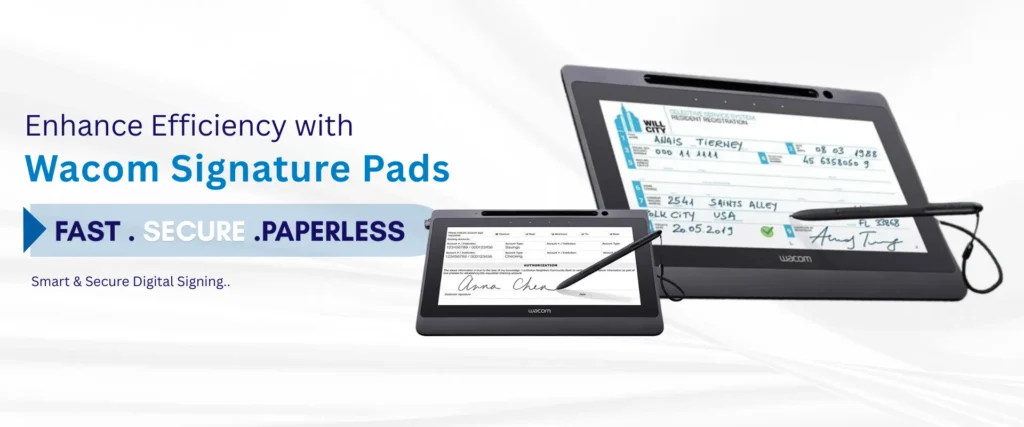
Beyond the creative tools most users associate with the Wacom brand, the company manufactures a dedicated range of enterprise-grade signature pads — most notably the STU (Sign Top Unit) series — and complementary document signing software such as Sign Pro PDF. These devices capture biometric e-signature data including pen pressure variation, stroke velocity, stroke timing, and spatial dynamics in a form that can be legally binding. In the UAE, Wacom signature pads are actively deployed at bank counters, insurance service desks, real estate transaction offices, hospital patient registration counters, HR departments, and government citizen service centers. Specialist distributors such as eTOP supply, configure, and support these enterprise Wacom solutions across Dubai and the broader GCC region.
How Do Pen Tablets Without Screens and Pen Displays With Screens Differ, and Which Should You Choose?
The choice between a screenless pen tablet and a pen display with an integrated screen is the most consequential purchasing decision a Wacom buyer makes, and neither option is universally superior — the right answer depends entirely on workflow, experience level, budget, and workspace ergonomics.
Pen tablets such as the Wacom Intuos require a connected external monitor. You draw across the tablet’s surface while keeping your eyes on the display. This physical separation between hand and eye can require several weeks of adjustment, but many seasoned artists actively prefer it because it keeps their full composition in view without a hand or bezel obscuring the image. Pen tablets are considerably more affordable, lighter, more portable, and generate no display heat — making them excellent choices for professionals who already own a high-quality monitor and want to maximize their budget on input precision rather than a second display.
Pen displays such as the Wacom One or Cintiq allow the user to draw directly on the screen surface, mirroring the intuitive feel of pencil on paper. This eliminates the hand-eye coordination learning curve and is widely considered more beginner-friendly. However, pen displays occupy more desk space, produce additional heat, and carry a meaningfully higher price tag. From an ergonomic standpoint, long sessions on a flat or low-angle pen display can cause neck and shoulder strain; an adjustable stand or monitor arm is a recommended accessory for regular use.
For UAE buyers: beginners, teachers in educational settings, and professionals transitioning from traditional media will typically find a pen display shortens the onboarding curve substantially. Experienced digital artists and professionals prioritizing long-session ergonomics and overall value-for-money should give serious consideration to a well-specified pen tablet paired with their existing quality monitor.
What Hardware Specifications Should UAE Buyers Compare Before Purchasing a Wacom Device?
Understanding how key specifications translate into real-world performance allows buyers to make value-based decisions rather than simply reacting to marketing claims or headline numbers.
- Screen Size and Workspace: Wacom pen displays range from compact 10.1-inch signature pad forms to 27-inch professional studio displays. A 13.3-inch model is well-suited to most desk setups and maintains portability. Larger formats (22-inch and above) suit detail-intensive illustration, multi-panel workflows, and architectural visualization — but require proportionally larger desk space.
- Resolution: Entry-level pen displays deliver 1920×1080 Full HD. Professional Cintiq Pro models reach 4K UHD (3840×2160). For photo retouching, print design, or color-critical illustration, 4K is a meaningful upgrade. For general drawing, animation reference work, or document signing, Full HD is entirely adequate and considerably more affordable.
- Pressure Levels: Consumer Wacom tablets offer 4,096 levels of pressure sensitivity; professional models provide 8,192. The practical benefit of 8,192 levels manifests most clearly in tasks requiring very fine gradation — such as variable-width inking or subtle airbrush blending. For general illustration, design work, and e-signature capture, 4,096 levels is more than sufficient for most workflows.
- Pen Tilt Support: Tilt recognition (typically ±60°) enables software to replicate the behavior of a tilted brush or calligraphy nib, widening strokes as the angle increases. This matters most to illustrators and painters; it is largely irrelevant for signature capture, photo editing, or general productivity use.
- Display Type and Contrast Ratio: Entry-level models use TFT LCD panels with standard contrast ratios. Professional Cintiq Pro models incorporate IPS or OLED panels with significantly higher contrast ratios, wider color gamuts, and more accurate factory calibration. For color-critical professional work, display panel quality is a non-negotiable investment that directly affects output accuracy.
- Response Time: Lower pen response times — typically 5–8 milliseconds in Wacom’s higher-end models — reduce the perceived lag between pen movement and cursor response. This matters most during fast-paced inking and gesture drawing; for slower, deliberate illustration or document signing, response time differences are largely imperceptible.
How Do You Download and Install Wacom Tablet Drivers for Windows and macOS?
Installing the correct Wacom tablet driver is not optional — without it, the device functions only as a basic pointing device, and pressure sensitivity, tilt recognition, custom ExpressKey mappings, and radial menu configurations are entirely unavailable. The following step-by-step process applies to most Wacom devices sold in the UAE market.
Step 1 — Identify your exact model number. The model number is printed on a label affixed to the underside of your Wacom device (examples: CTL-6100WL for Intuos Medium Bluetooth; DTH-1320 for Cintiq Pro 13). Do not download a generic Wacom driver — each device family requires its own specific driver package, and mismatched drivers frequently result in detection failures or reduced functionality.
Step 2 — Navigate to the official Wacom download page. Go to wacom.com/support and search by your exact product model number. The Wacom download page lists the current stable driver version for Windows 10, Windows 11, and macOS — including Apple Silicon M1, M2, and M3 compatible builds. Always use the official Wacom download source; third-party driver repositories can introduce compatibility issues or security vulnerabilities onto your system.
Step 3 — Install the driver and restart your computer. Run the downloaded installer, accept the license agreement, follow the on-screen prompts, and restart your machine when instructed. After restarting, the Wacom Desktop Center application launches automatically, providing access to all Wacom tablet software settings including pen button mapping, display mapping (for pen displays), and on-screen controls.
Step 4 — Troubleshoot if the tablet is not detected. If the device remains undetected after installation: (a) connect via a different USB port or replace the cable; (b) fully uninstall the existing driver using the Wacom Tablet Utility before performing a clean reinstall; (c) temporarily disable antivirus or security software during the installation process; (d) on Windows, check Device Manager for USB controller driver updates. On macOS, navigate to System Settings → Privacy & Security and grant the Wacom driver the Input Monitoring and Accessibility permissions it requests — these are required for full functionality. Linux compatibility remains limited to a subset of older Wacom models via open-source kernel drivers; not all features are available, and prospective Linux users should thoroughly verify model-specific compatibility before purchasing.
The Wacom Connect feature, accessible through Wacom Desktop Center, enables wireless pairing for Bluetooth-capable models and facilitates connection of optional accessories such as the ExpressKey Remote. Keeping the Wacom tablet driver updated ensures continued compatibility with major creative software releases including Adobe Creative Cloud, Clip Studio Paint, and Corel Painter.
Where Can You Buy Wacom Products in the UAE, and What Are the Typical AED Price Ranges?
The UAE has a mature and competitive retail ecosystem for technology products, providing Wacom buyers with multiple purchasing channels across online and physical retail — each offering different levels of pricing, after-sales support, and product availability.
- Amazon.ae: Offers one of the broadest Wacom selections available in the UAE, including the Wacom One 13.3-inch pen display and multiple Intuos variants. Delivery is typically one to two business days across the Emirates, with same-day delivery available for Prime members in Dubai and Abu Dhabi. The standard Amazon.ae return window for most electronics is 30 days from delivery.
- Carrefour UAE (online and in-store hypermarkets): Stocks select Wacom Intuos and Wacom One models at competitive price points. Promotional pricing is frequently offered during White Friday, Ramadan, and UAE National Day sales events.
- Virgin Megastore UAE: Physical locations at Mall of the Emirates and other major malls allow buyers to handle and evaluate devices before purchasing — a meaningful advantage when assessing pen feel and display quality in person.
- Microless.com: A UAE-based online electronics specialist that lists a range of Wacom tablets including Intuos, Cintiq, and selected accessories at competitive AED-denominated prices.
- Al Ershad and regional IT distributors: For volume or enterprise procurement, regional IT distributors can offer negotiated pricing and logistical support for multi-unit deployments.
- eTOP (etopme.ae): As an authorized distributor of biometric identification and security solutions across Dubai and the GCC, eTOP supplies Wacom signature pads and enterprise pen input devices for corporate, government, and healthcare clients. eTOP provides local technical configuration, software integration support, SLA-backed after-sales service, and tailored procurement for organizations requiring bulk deployment or system integration across the UAE.
The following table presents indicative AED price ranges. Actual prices vary by retailer, model generation, and promotional period.
| Product | Type | Key Specification | Approx. AED Price | Best For |
|---|---|---|---|---|
| Wacom Intuos Small | Pen Tablet (no screen) | 4,096 pressure levels, USB/Bluetooth | AED 280–380 | Students, beginners, casual use |
| Wacom Intuos Medium | Pen Tablet (no screen) | 4,096 pressure levels, USB/Bluetooth | AED 450–580 | Graphic design, photo editing professionals |
| Wacom One 13 (Gen 2) | Pen Display (with screen) | 1920×1080 FHD, 4,096 pressure, 13.3″ | AED 1,100–1,400 | Beginners to intermediate digital artists |
| Wacom Cintiq 16 | Pen Display (with screen) | 1920×1080 FHD, 8,192 pressure, 15.6″ | AED 2,200–2,800 | Intermediate to advanced creatives |
| Wacom Cintiq Pro 27 | Pen Display (with screen) | 4K UHD, 8,192 pressure, 27″, OLED option | AED 10,000–13,500 | Professional studios, animation, VFX |
| Wacom STU Signature Pad | Enterprise Signature Pad | LCD display, biometric signature capture | AED 900–1,800 | Banking, legal, HR, government counters |
How Does Wacom Support Digital Signing and Enterprise Workflows in the UAE?
Wacom’s relevance in the UAE extends well beyond creative applications. The brand’s STU signature pad series and associated enterprise software are actively used by organizations digitizing document-heavy workflows in compliance with the UAE’s accelerating paperless transformation agenda.
Wacom STU signature pads capture biometric e-signature data — including the pressure applied at each point of the pen stroke, the velocity and acceleration of each movement, and the precise timing sequence of the entire signature event. This biometric data layer distinguishes a Wacom e-signature from a simple scanned image of a signature, providing a technically robust foundation for identity verification and post-signing dispute resolution. The devices integrate with Wacom’s own Sign Pro PDF software as well as a broad ecosystem of third-party document management and workflow platforms.
For Arabic-language workflows — a critical consideration in UAE corporate and government environments — Sign Pro PDF and compatible third-party platforms support right-to-left text rendering. Organizations can present Arabic-language contracts, service agreements, or consent forms directly on the signature pad’s LCD screen, allowing the signatory to read the complete document before inking their signature. This localization capability is particularly significant for UAE financial institutions, real estate agencies, and government service counters where Arabic is the primary operational language.
Enterprise procurement of Wacom signature pads in the UAE should be managed through a specialist distributor capable of providing hardware configuration, software integration, staff training, volume pricing, and ongoing technical service. eTOP, headquartered in Dubai, fulfills this role for corporate and government clients across the UAE and GCC, ensuring that Wacom signature pad deployments are operationally reliable and correctly integrated with existing document management infrastructure.
What Warranty and After-Sales Support Can UAE Buyers Expect from Wacom?
Wacom products sold through authorized UAE retailers typically carry a one-year manufacturer’s warranty covering verified manufacturing defects under normal operating conditions. The following channel-specific guidance applies to buyers across the Emirates.
- Amazon.ae: A 30-day return window applies to most electronics from the delivery date. Warranty claims beyond 30 days are directed to the manufacturer or an authorized regional service center. Ensure the product is sold and dispatched by an authorized Amazon seller to maintain warranty validity.
- Carrefour and Virgin Megastore UAE: These retailers typically observe a 7-day return window for opened electronics. Warranty service beyond the initial return period is referred to the brand or its authorized UAE service agent. Retain all original packaging and accessories, as incomplete returns may be rejected.
- Specialist distributors such as eTOP: Enterprise purchases through authorized regional distributors typically include SLA-defined support agreements, on-site service options for large-scale deployments, and direct escalation channels to Wacom’s regional technical representatives — providing a significantly higher tier of post-sale assurance than consumer retail channels.
- Wacom direct support (wacom.com/support): Wacom’s global support portal offers ticket submission, live chat during published business hours, driver download access, and a community forum covering the most common driver, software, and hardware issues. This channel is available to all registered Wacom product owners regardless of where the device was purchased.
Consumable items — most notably replacement pen nibs, which wear gradually with normal use — are not covered under the standard manufacturer’s warranty but are widely available as accessories through the same UAE retail channels and through Wacom’s online store. Buyers who use their devices intensively should factor nib replacement kits into their total cost of ownership when comparing Wacom models. Most Wacom pens ship with a small set of spare nibs included in the box; additional bundles are available at modest cost.
Frequently Asked Questions
Which Wacom tablet is best for beginners in the UAE, and how do the Intuos, Wacom One, and Cintiq differ for drawing and design?
For most beginners in the UAE, the Wacom Intuos Small or Medium is the most cost-effective and practical starting point, available from approximately AED 280 and bundled with creative software. If you prefer the immediacy of drawing directly on a screen, the Wacom One 13.3-inch pen display is an excellent beginner-to-intermediate choice at approximately AED 1,100–1,400. The Cintiq range — starting around AED 2,200 for the Cintiq 16 — is engineered for intermediate to professional users and is not typically recommended as a first purchase unless the budget is available and the professional workflow specifically demands higher pressure sensitivity and superior display quality.
How do I find and install the correct Wacom drivers for my specific model on Windows or macOS, and what should I do if the tablet is not detected?
Locate the model number printed on the label on the underside of your device, then go to wacom.com/support and search for that specific model. Download the current driver for your operating system — Windows 10/11 or macOS, including Apple Silicon builds. Run the installer and restart your computer. If the device is not detected after installation, try a different USB port or cable, perform a clean uninstall using the Wacom Tablet Utility before reinstalling, and on macOS check System Settings → Privacy & Security to confirm all required permissions have been granted. Always use the official Wacom download page rather than third-party driver sites.
What screen size and resolution should I choose for a Wacom pen display if I mainly draw, photo edit, or sign documents?
For drawing and general illustration, a 13.3-inch Full HD (1920×1080) pen display such as the Wacom One is well-matched to most standard desk setups. Professional photo editing and color-critical design benefit from larger displays (16-inch and above) with higher resolutions (4K UHD), which enable more accurate pixel-level color judgment. For corporate document signing, a compact dedicated signature pad with an LCD display (typically 4.3-inch to 10.1-inch) is purpose-built for that workflow; resolution requirements are modest, and biometric capture accuracy is the primary specification to evaluate.
Are Wacom tablets compatible with Windows, macOS, and Linux, and do they work with Photoshop and Illustrator?
Wacom tablets and pen displays are fully compatible with Windows 10 and 11 and with macOS including Apple Silicon (M1, M2, M3). Adobe Photoshop, Illustrator, Lightroom, InDesign, Clip Studio Paint, Corel Painter, Autodesk SketchBook, and the vast majority of professional creative applications support Wacom pen pressure natively. Linux compatibility is significantly more limited — only a subset of older Wacom models is supported through open-source kernel drivers, and not all pen features are accessible. Linux users should thoroughly verify model-specific compatibility before purchasing a Wacom device.
Where can I buy authentic Wacom products in the UAE, and how do retailer warranties and return policies compare?
Authentic Wacom products are available in the UAE through Amazon.ae (1–2 business day delivery, 30-day return window), Carrefour UAE, Virgin Megastore, and online retailers including Microless.com. For enterprise and signature-pad procurement, authorized distributors such as eTOP in Dubai provide specialized support, configuration services, and SLA-backed after-sales coverage tailored to corporate and government deployments. Standard manufacturer warranty across all authorized channels is one year; retailer return windows range from 7 days (Carrefour, Virgin Megastore) to 30 days (Amazon.ae) for opened electronics.
What is the difference between a pen tablet without a screen and a pen display with a screen, and which suits my workflow better?
A pen tablet (e.g., Wacom Intuos) is a flat input surface with no display; you draw on it while looking at an external monitor. A pen display (e.g., Wacom One, Cintiq) has a built-in screen and allows you to draw directly on the image. Pen tablets are more affordable, lighter, and preferred by experienced artists for long-session ergonomics. Pen displays are more intuitive for beginners and professionals transitioning from traditional media, but they cost more and require more desk space. Your budget, experience level, and whether you already own a quality monitor are the key deciding factors.
How important are pressure levels (1,024 vs 4,096 vs 8,192), EMR technology, and battery-free pens for everyday use?
For most everyday workflows — graphic design, casual illustration, photo editing, and document signing — 4,096 pressure levels is entirely sufficient and perceptibly indistinguishable from 8,192 levels in the vast majority of tasks. The 8,192-level advantage becomes meaningful for professional illustrators performing very fine-detail variable-width inking or subtle airbrush blending. EMR technology is the foundational reason Wacom pens require no battery: the tablet’s electromagnetic field powers the pen passively, keeping the pen lightweight and eliminating any maintenance burden. This has a tangible impact on drawing comfort and overall pen feel during extended working sessions.
What after-sales support and warranty coverage are available for Wacom products purchased in the UAE?
All Wacom products sold through authorized UAE channels carry a one-year manufacturer’s warranty covering manufacturing defects. Amazon.ae provides a 30-day return window; Carrefour and Virgin Megastore typically offer a 7-day window for opened electronics. Wacom’s global support portal at wacom.com/support provides ticket-based support, live chat, and driver resources for all registered product owners. Organizations that procure enterprise Wacom solutions through authorized distributors such as eTOP gain access to SLA-backed service agreements, on-site support for large deployments, and direct escalation channels to regional Wacom technical representatives — a materially higher tier of post-sale assurance compared to consumer retail channels.
Conclusion: Selecting the Right Wacom Solution for Your UAE Workflow
Wacom remains the definitive standard for pen input technology across every segment it serves — whether you are a student beginning a creative journey in Sharjah, a professional illustrator working in Dubai’s media free zones, or a corporate procurement manager sourcing digital signature hardware for a bank, hospital, or government service center in Abu Dhabi. The depth and breadth of the Wacom portfolio — from the accessible Intuos and Wacom One to the professional Cintiq Pro series and enterprise STU signature pads — means there is a purpose-engineered device for virtually every workflow, team size, and budget in the UAE market.
Individual buyers can confidently purchase through Amazon.ae, Carrefour, Virgin Megastore, or Microless for competitive AED pricing and fast UAE delivery. Organizations requiring Wacom signature pads for enterprise e-signature workflows, corporate paperless initiatives, or government digital service counters benefit from working with a specialist regional distributor who can provide hardware configuration, software integration, and ongoing technical support.
eTOP, based in Dubai, is an authorized distributor of Wacom signature pads and pen input solutions for enterprise and government clients across the UAE and GCC. eTOP provides end-to-end procurement, technical configuration, software integration support, and SLA-backed after-sales service to ensure that Wacom deployments deliver measurable operational value from day one. Visit etopme.ae to explore Wacom signature pad options, request a live product demonstration, or obtain a competitive quotation for your organization’s next deployment.