







A VIRDI access control system is a biometric fingerprint reader that manages both door security and staff time attendance for UAE businesses. It mounts at entry points, verifies identity via fingerprint in under a second, and logs each entry directly into VIRDI’s time and attendance software — with cloud sync for multi-branch companies. Installation typically takes a few hours per door once power, network, and the employee database are ready.
Why Businesses in the UAE Choose VIRDI
VIRDI’s biometric access control systems are built for the demands of UAE commercial buildings — heat, dust, and high daily foot traffic — while keeping enrollment and attendance reporting simple for HR and facilities teams to manage.
- Fast, accurate fingerprint recognition suited to high-traffic entry points
- Cloud-based time and attendance sync across multiple sites
- Compatible with standard door lock hardware and access control wiring
- Reliable performance in UAE indoor climate conditions
- Local distributor support for installation, enrollment, and servicing

Pre-Installation Checklist
Before your VIRDI biometric access control installation begins, confirm the following:
- Choose your locations — Identify every door or entry point that needs access control.
- Check power supply — Ensure 12V DC power is available near each installation point.
- Confirm network connectivity — A stable internet connection is required for cloud-based attendance features.
- Prepare your user database — Have your employee list ready for fingerprint enrollment.
- Plan a backup authentication method — Card or PIN backup in case of enrollment issues.
Step-by-Step VIRDI Installation Process
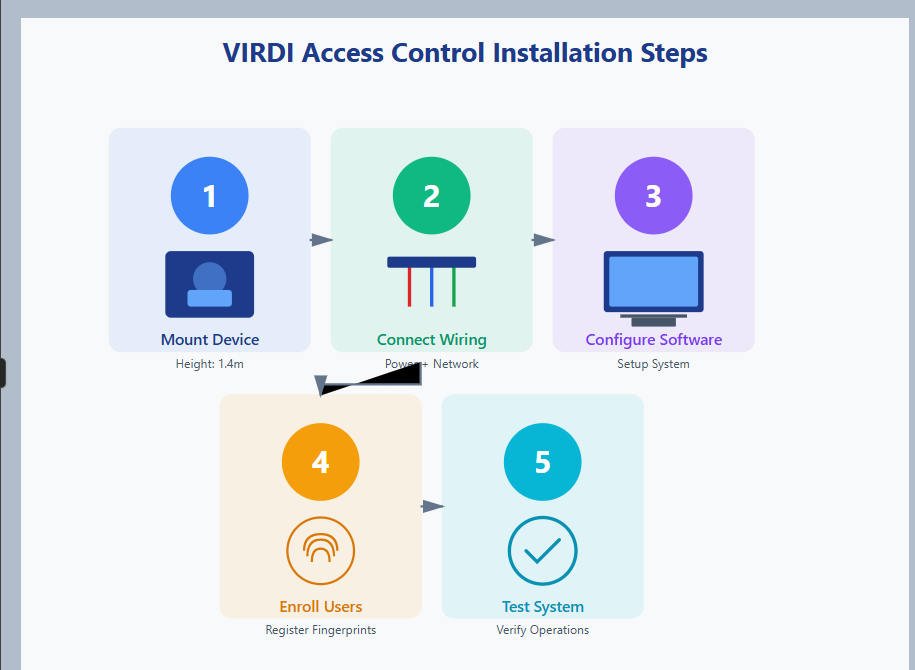
Step 1: Mount the Device
- Install the VIRDI reader at approximately 1.4 meters height using the supplied mounting bracket, on a stable surface near the door frame for convenient access.
Step 2: Wiring Connections
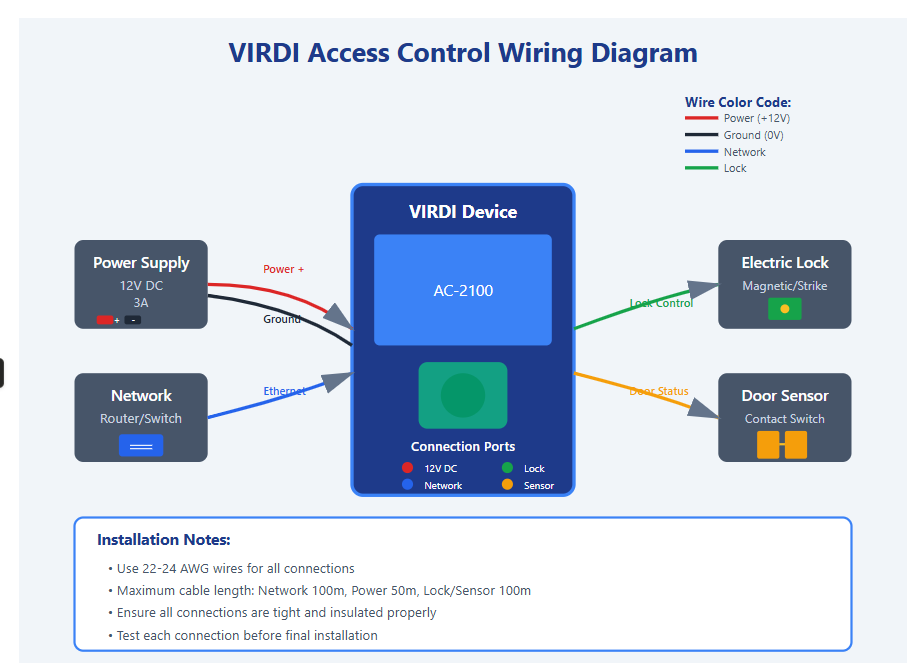
- Connect the power supply, network cable, and door lock mechanism following the wiring diagram in the VIRDI manual. Your authorized VIRDI distributor can provide technical support during this step.
Step 3: Software Configuration
Install the VIRDI management software and configure:
- Time zone and date format
- Network settings for cloud-based attendance sync
- Access levels and door schedules
- Integration with your existing HR/payroll workflow
Step 4: Enroll Users
- Register fingerprints for all authorized personnel. VIRDI readers require 2–3 scans per finger for accuracy — enroll at least two fingers per employee as a backup.
Step 5: Test the System
- Verify fingerprint recognition, door unlock timing, and attendance logging. Test denied-access scenarios and emergency override before going live.
Common Installation Mistakes to Avoid
- Mounting the device in direct sunlight, which can affect fingerprint scanning
- Using inadequate power supply, which can cause reboots
- Weak network connectivity, which disrupts cloud sync features
- Skipping firmware updates after installation
Choosing a VIRDI Supplier in the UAE
Work with a supplier that offers certified VIRDI partnership status, on-site installation support, ongoing maintenance contracts, and training for your security or facilities team.
If you are sourcing hardware for a project, you can compare local stock availability for corporate models via eTOP